
Why Radio Was an Absolutely (Un)necessary Feature
Gray Horizon never needed a radio. I built one anyway, from three music files inside the game to object storage, HTTP range streaming and a live waveform.
Contents
Gray Horizon really did not need a radio.
You can work, trade, vote, run a company and invade your neighbours perfectly well without one. Radio gives you no XP. It doesn’t make your factory faster. There is no secret +5% productivity buff for listening to classical music while invading France (unless of course, your music choice has them surrender).
I built it anyway. Because why not?
The reason was less practical than almost anything else in the game. If I expect people to spend hours looking at this map, reading the newspapers and running whatever little empire they’ve built for themselves, then the world having a sound of its own seemed nice. That’s it, that’s the whole reason. The design even said how to judge it: the radio works if the player stops thinking about it.
It was supposed to be small. A Play button, a few tracks, remember the volume, never get in the way of the game.
Some time later it had three routes in the API, a home in object storage, byte-range streaming, runtime validation and its own publishing script. By the next afternoon it had 100 tracks.
And then I listened to them, and there was rap on the Jazz station. That went well.

It was supposed to have no backend
My first design for Radio was boring on purpose.
Three audio files would ship inside the web app. The list of tracks would be a TypeScript file, compiled with everything else. The browser would get one <audio> element for the whole game, and your volume and your last track would live in localStorage. That was basically the entire architecture.
The implementation plan said it in one line:
No backend change of any kind.
And I meant it. No endpoint, no database table, no migration, no realtime event. The files sat in the web app’s public folder and the browser played them from there.
What I expected to be hard turned out to be free. Music has to keep playing while you move around the game, and in a lot of web apps changing pages tears the player down. But Gray Horizon is one page. Map, Market, Press, all of them are views inside it, so there’s no navigation for the music to survive. The real danger was smaller and sillier: in development, React deliberately runs some setup code twice to catch mistakes, and an audio element created there becomes two players. The fix is to make the player once, the first time it’s needed, outside React entirely.
The boring version had one nice property, and I’d like you to remember it. Every track has to be cleared for commercial use, because the game has a store, so the licence field commercialUse wasn’t typed as a boolean. It was typed as the literal value true. If somebody wrote false there, the game wouldn’t compile. This comes back later.
The only server-side change in the whole plan was two security headers, which are a small story on their own. The security policy had a comment explaining why audio was blocked:
The game has no audio, no video, no plugins and no frames.
Which, until that afternoon, was true. Permissions-Policy: autoplay=() made the browser refuse to play anything, even after a click, and media-src 'none' refused to even load the file. The same file also says that the day the game really needs one of these, somebody has to come back and say which one, instead of it quietly starting to work. I like that rule a lot. So I came back and said which: autoplay=(self), and a media-src that allows Gray Horizon’s own audio and nothing else. Nothing was broken here, the policy was doing its job, it just didn’t know about the radio yet.
My obsession to overengineer stuff broke the design
The ‘boring’ first version immersed me for about five hours, then I asked myself:
Can I add and remove music without pushing an update?
With version 1, no. A song was part of the application. One new track meant changing code, rebuilding the release images and deploying the whole game, and the audio itself was baked into the web image. For something I wanted to treat as content, that was ridiculous. I didn’t want adding a song to be a software release.
The music had to leave the build. The audio files and the covers moved into the object storage Gray Horizon already had, the same place that holds avatars and newspaper logos, and the track list became a catalogue.json sitting next to them. The browser now asks the API for the catalogue, and when you press Play it asks the API for the audio too. It never sees a storage address or a key. The API reads from storage and streams the bytes back.
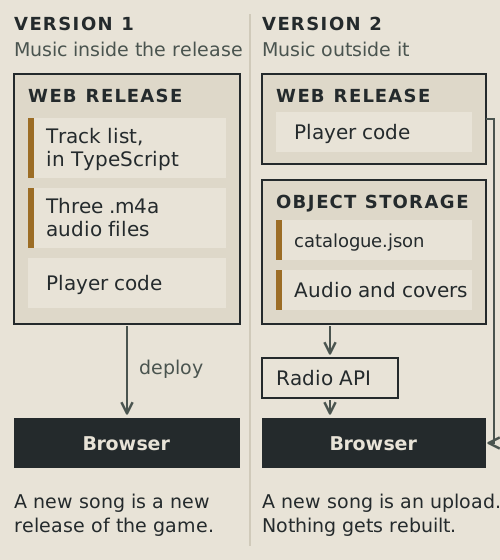
The first real test was the same evening: 23 more songs. I didn’t bump the version, didn’t build an image and didn’t deploy anything. I uploaded the files, then the new catalogue, and anyone who opened the game after that had 49 tracks, from a server nobody had touched. It was the first time I could change something players see without shipping Gray Horizon itself.
(There is one asterisk on “anyone who opened the game after that”. It’s at the very end.)

Streaming a song is not the same as sending one
Moving the files out of the frontend created what I think is the most interesting part of the whole thing.
Why not just read the file and send it? The API already had a helper for that, for pictures. It reads the whole object into memory, then sends it. For a 200 KB avatar that’s fine. For a 5 MB song it’s a bad idea, because the API runs with a few hundred megabytes of memory and every player pressing Play would park a whole track in it.
Browsers don’t want media that way anyway. A browser doesn’t really “download a song”, it asks for pieces of it with an HTTP header called Range. The request names the bytes it wants, and a server that understands it answers with 206 Partial Content and only those bytes. That’s how playback can start before the file has arrived, and how you can jump to the middle of a track without waiting for everything before it.
Here’s a real one, against one of the Jazz tracks on my local copy of the game:
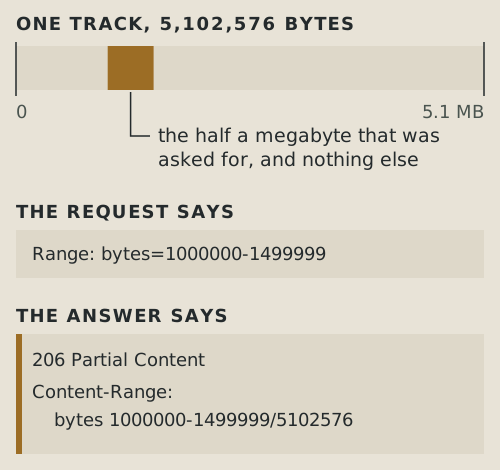
Radio’s API never buffers a track. It checks the header against one small pattern, /^bytes=(\d*)-(\d*)$/, which is the single-range form a media element sends. Anything else, several ranges or plain nonsense, gets the whole file, and HTTP explicitly allows that. A valid range is handed straight to storage, so asking for the first kilobyte of a song reads one kilobyte from storage instead of five megabytes. Whatever storage sends back goes out to the browser as a stream, one chunk at a time.
What I like most is that the API doesn’t fully trust storage either. A storage server is allowed to ignore Range and send the entire object back with a plain 200. If the API passed that on and called it a 206, the browser would be getting a lie. So when the API asked for a slice and got the whole thing, it cuts the slice out itself, while the bytes are flowing past:
onlyBytes, apps/api/src/radio/radio.service.ts
function onlyBytes(source: Readable, start: number, end: number): Readable {
  let seen = 0;
  const window = new Transform({
    transform(chunk: Buffer, _encoding, done) {
      const from = seen;
      seen += chunk.byteLength;
      if (seen <= start || from > end) return done();
      const take = chunk.subarray(
        Math.max(0, start - from),
        Math.min(chunk.byteLength, end - from + 1),
      );
      if (take.byteLength) this.push(take);
      if (seen > end) {
        source.destroy();
        this.end();
      }
      done();
    },
  });
  /* A failure upstream has to reach whoever is reading the window, or the
     reply hangs open on a stream that is never going to produce anything. */
  source.on("error", (cause: Error) => window.destroy(cause));
  window.on("close", () => source.destroy());
  return source.pipe(window);
}
In plain English: seen counts how far into the file we are. A chunk that ends before the window starts is thrown away. A chunk that overlaps the window is cut down to the overlapping part with subarray, which is a view into the same memory rather than a copy, and pushed on to the browser. The moment seen passes the end of the window, the stream coming from storage is destroyed, so the rest of the file is never even pulled off the network. Nothing piles up anywhere.
Closing the tab works the same way. People stop halfway through songs all the time, so when the browser’s connection closes, the API destroys the read from storage too. There’s no reason to keep downloading a song nobody is listening to.
The production check for all of this was one request for bytes 0 to 1023 of a real track. It came back 206 Partial Content with 1,024 bytes in it. Sometimes “it works” really is that glamorous.
The catalogue escaped the compiler
Moving the catalogue out of TypeScript had a cost, and I think it’s the easiest one to miss.
Remember commercialUse: true? In version 1, that true was part of the type itself. A track whose rights weren’t established couldn’t compile.
A JSON file in a bucket has no compiler. JSON.parse hands back whatever is in the file, and the TypeScript type for a track stops being a guarantee and becomes a polite assumption. If the file says false, or forgets the field, TypeScript can’t know, because it never sees the file: it checks the code when the game is built, and this file shows up while the game is running.
The check had to move to where the data comes in:
radioTrackProblems, packages/domain-types/src/radio.ts
if ((licence as { commercialUse?: unknown }).commercialUse !== true)
  problems.push(
    `${track.id}: the licence does not say \`commercialUse: true\`. The ` +
      `game has a store and a premium currency, so a track whose rights ` +
      `have not been established for commercial use cannot be played`,
  );
The strange-looking cast through unknown is there because the type promises the value is always true, so as far as the compiler is concerned this check can never fire. Which is also why nobody had written it before.
The same rules now run in three places. The publishing script refuses to publish a catalogue with any problem in it. The API drops a bad track when it reads the catalogue, instead of failing the whole radio. The browser checks the shape of what comes back. And still, not everything the compiler gave me came back: a catalogue uploaded by hand, without the script, skips the strictest checks.
I’m fine with that trade, because music is content and adding a song shouldn’t be a software release. But taking data out of the build isn’t free. You’re moving the place where mistakes get caught.
Catalogue last, always
The publishing script has one rule I like enough to show, even though it’s almost embarrassingly simple. Upload the audio and the covers first. Upload catalogue.json last.
main, infrastructure/scripts/radio-publish.mjs
/*
 * The catalogue last, always.
 *
 * It is the only object anything reads by itself; the audio and the art are
 * only ever reached through it. Uploading it first would name bytes that
 * are not there yet, and the window is as long as the upload takes.
 */
await bucket.put(
  CATALOGUE_KEY,
  new TextEncoder().encode(`${JSON.stringify(document, null, 2)}\n`),
  "application/json",
);
The catalogue is the only file anything reads on its own, and the audio is only ever found through it. Upload the catalogue first and, for as long as the uploads take, players can see tracks whose files don’t exist yet. Upload the files first and nobody knows they’re there until the catalogue makes them all visible at once. Nothing clever, just the safe order, and those are often the nicest fixes.
Of course the order only helps if the files exist at all, and the very first dry run, before anything went to production, found two ways they didn’t. Some cover images had capital letters in their names and the catalogue didn’t. And the three original tracks weren’t on disk at all: taking the music out of the repository had taken them out of my working copy too, so there was nothing to upload. Either one would have published a catalogue pointing at files that weren’t there. That’s what the dry run is for: before it uploads a single byte, the script checks that every file the catalogue names is on disk, and stops if one isn’t.
Then I wanted a waveform
The only way to make a unnecessary feature even more unnecessary is to add another unnecessary feature on top it, thus the waveform was born.
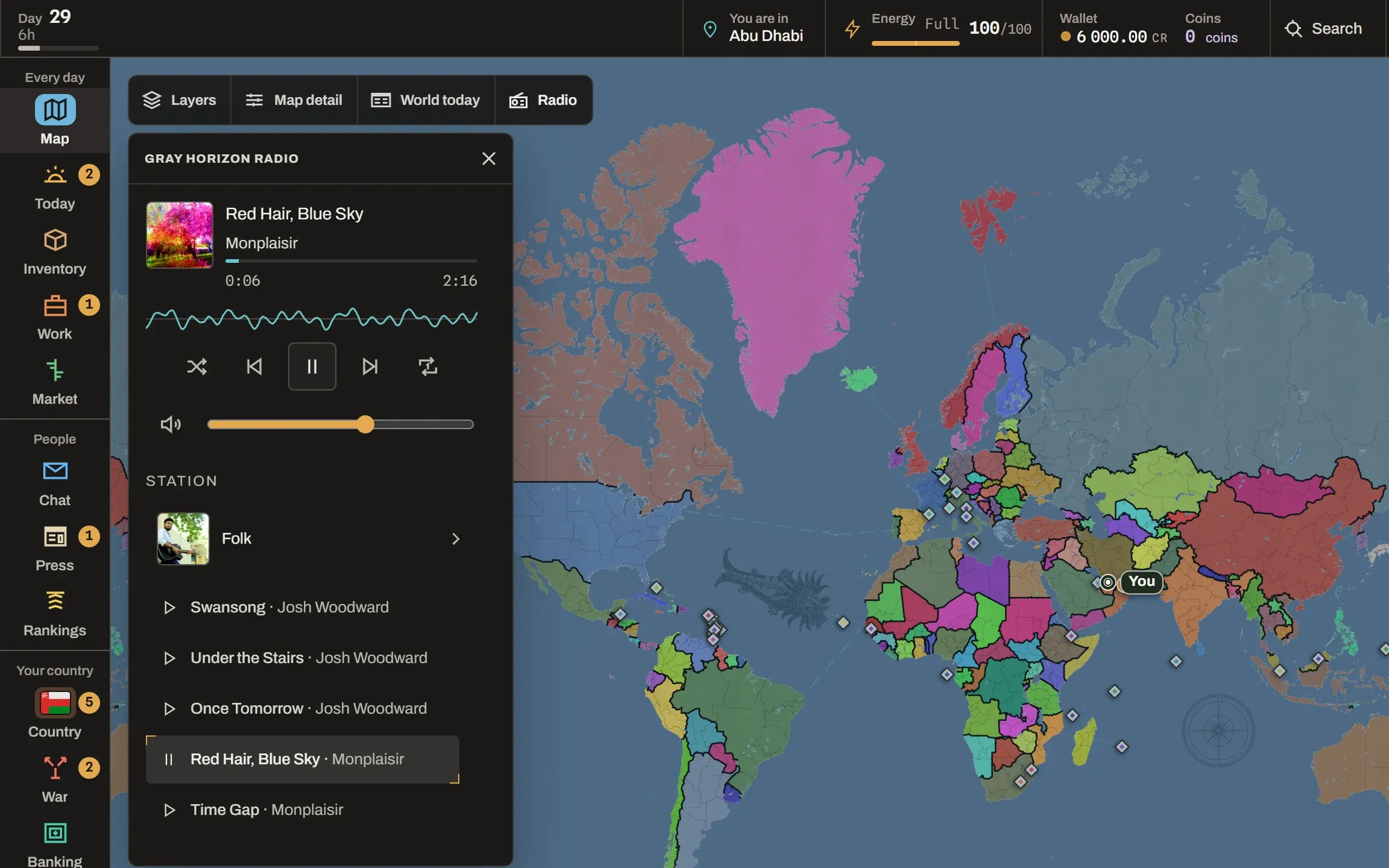
There are two lines in the panel now that look a bit alike (you can see both in the picture at the top). The thin progress line under the title shows where you are in the track. The wavy line under that one, which the settings call Wave, has nothing to do with where you are.
The Wave isn’t a picture of the whole song, like the waveform you’d see in an audio editor. Nothing calculates it when a track is uploaded, nothing stores it, and you can’t click it to jump around. It’s more like a tiny oscilloscope: it shows the sound that is playing right now, and only that.
It works through the browser’s Web Audio API. While the panel is open, the audio element is also connected to an AnalyserNode, and on every frame the visualizer asks it for the last 1,024 samples of sound, which is about a fiftieth of a second. Each sample comes out as a byte from 0 to 255. Silence is 128. Above 128 the speaker is pushed one way, below 128 the other way.
Remember that last part, because my first version threw half of it away.
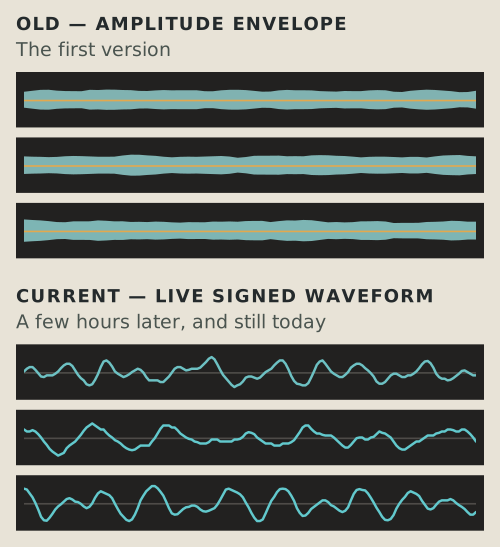
The first Wave turned every sample into Math.abs(sample - 128): how far from silence, but not in which direction. Then it split the window into 56 buckets, took the biggest value in each, mirrored the result above and below the centre line and filled it in.
What that draws is called an amplitude envelope. Without the sign, the shape can never cross the middle. And over the hundredth of a second that version looked at, music barely changes in loudness, so every bucket ended up at roughly the same height. My verdict when I first saw it was: “it looks more like a blob rather than a waveform, it is constantly thick, so it doesnt really have high and lows”.
I was right, even if I couldn’t have told you why at the time. No amount of tuning was going to fix it, because the thing being drawn was never the wave. I stopped trying to make the blob prettier and fixed the data instead.
The current version keeps the sign. It picks 160 points across the 1,024 samples, averages each one with its two neighbours to take the hair off it, and draws a line through them:
drawWave, apps/web/components/radio/radio-visualizer.tsx
const step = (sampleCount - 1) / (pointCount - 1);
const at = (index: number) => ((data[index] ?? 128) - 128) * scale;
const valueAt = (point: number) => {
  const i = Math.round(point * step);
  const a = at(Math.max(0, i - 1));
  const b = at(i);
  const c = at(Math.min(sampleCount - 1, i + 1));
  /* A three-sample mean, which is a gentle low pass and nothing more. It
     softens the jaggedness a 24px strip exaggerates without moving a zero
     crossing anywhere it was not already going. */
  return Math.max(-1, Math.min(1, (a + b + c) / 3));
};

let loudest = 0;
const y: number[] = [];
for (let point = 0; point < pointCount; point++) {
  const value = valueAt(point);
  if (Math.abs(value) > loudest) loudest = Math.abs(value);
  y.push(mid - value * (mid - 1));
}
at turns a byte into a signed number: 128 becomes zero, and scale stretches it so the loudest recent moment reaches the edge. step spreads 160 points over 1,024 samples, so about one sample in six becomes a point. valueAt averages that sample with its neighbours and keeps the result between −1 and 1. The last line turns it into a height on the canvas, positive values above the middle and negative ones below. (loudest only picks the colour of the line.)
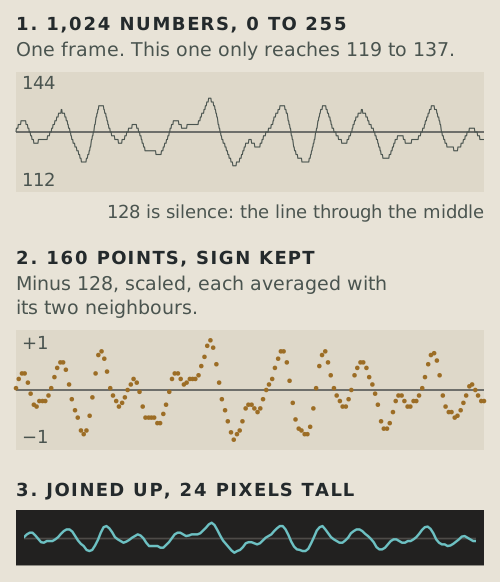
scale is the one trick in there. At a normal volume the numbers hardly move away from 128, as you can see above, so the visualizer remembers the loudest recent moment and divides everything by it. Something louder takes over immediately, the remembered peak lets go slowly, and the scale eases toward its new value so the line doesn’t jump around every frame. There’s also a floor, so near-silence doesn’t turn one rounding step into a full-height wave.
Is any of this proper signal processing? No. It skips samples, so it aliases, and it’s 24 pixels tall. Nobody is mastering an album with Gray Horizon Radio (I hope). But it reacts to the real sound, and once it kept the sign, it finally looked like the thing I thought I was building in the first place.
The visualizer broke Pause
Naturally, making the audio prettier created an audio bug. To draw the Wave, the sound has to go through Web Audio:
<audio> → MediaElementAudioSourceNode → AnalyserNode → speakersIt has to come out the other end too, or you’d get a lovely waveform and complete silence.
Then Safari happened. I’ve received an complaint about the music player bugging on Safari. Pause said paused, and the music kept going. On Safari, once the sound went through that graph, pausing the <audio> element didn’t stop it.
Before the visualizer, the <audio> element was the whole audio system. After it, there was an AudioContext as well, and Pause had to stop that one too. Now Pause suspends the context, and Play resumes it on the way into play(), while still inside your click, because iOS only lets audio resume from a real user gesture.
That same function also holds a bug from the very first hour, and it’s a good one:
start, apps/web/lib/radio/engine.ts
function start(element: HTMLAudioElement, id: string): void {
  resumeAudioGraph();
  void element.play().catch((cause: unknown) => {
    const name = (cause as { name?: string } | null)?.name;
    if (name === "NotAllowedError") {
      settle({ status: "blocked" });
      return;
    }
    if (name === "AbortError") return;
    onError(id);
  });
}
play() returns a promise, and it can fail for very different reasons. NotAllowedError means the browser’s autoplay policy said no, so Radio says it’s blocked instead of looking broken. AbortError means the load was interrupted, usually because the track changed before the last one started, which is perfectly normal. Anything else counts as a broken track.
The first version treated AbortError as a broken track too, and that was only half the bug. The error arrives a moment late, after the player has already moved on, and the old handler never asked which track the failed play() was for. It asked which track was playing now. It blamed the wrong one, and skipping past a “broken” track started another load, which aborted another play(), which blamed the next track:
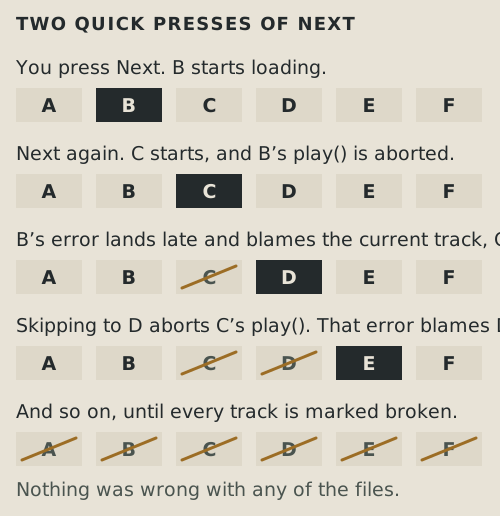
Every song was fine, and the radio ended up announcing that it was unavailable. The fix is the id passed into start() above: the error handler can only blame the track it was trying to play, and an abort doesn’t count as a failure at all.
The computer was very good at licences
Before a song gets into Gray Horizon I need to know I’m allowed to use it. So the catalogue keeps the licence for every track, and the validator refuses anything NonCommercial or NoDerivatives. Those rules are patterns on the licence’s name, and one of them had a hole. The first line is how it was, the second is the fix:
REFUSED, before and after
{ pattern: /(-ND\b|NoDerivatives)/i, why: "NoDerivatives" },
{ pattern: /(-ND\b|NoDeriv)/i, why: "NoDerivatives" },
Creative Commons’ 3.0 licences don’t say NoDerivatives. They say NoDerivs, as in Attribution-NoDerivs 3.0 Unported, and neither half of the old pattern matches that. -ND isn’t in there at all, because after the hyphen comes NoD. And NoDerivatives obviously isn’t in NoDerivs. The fix was deleting six letters, so the pattern looks for NoDeriv, which both spellings start with.
My favourite part is the test that came with the fix. Its comment explains the bug wrong: it blames \b, the word boundary, and says the e after -NoDeriv stops it matching. That kind of failure does exist (/-ND\b/i doesn’t match CC BY-NDerivs, because D and e are both word characters), but it’s not what happened here, this string never got as far as the boundary. And it doesn’t matter, because the test’s input is the real name, Attribution-NoDerivs 3.0 Unported. The test protects the right thing no matter whose explanation was correct. No released track was affected, the hole was found before anything walked through it.
A pattern can only check the words it’s given, and the words can lie. While I was gathering more music, a genre search on one big archive gave me a rap album everyone has heard of and a record by a famous jazz drummer, both marked CC0, free for anyone to use. They are obviously not. My validator would have accepted both without blinking, because the licence field said the right thing. None of the music came from a search like that in the end. Every licence had to be read from the source’s own records, and a copy of that record is saved in the repository, so the decision can be checked later.
By the next afternoon the catalogue had 100 tracks on eight stations, and I could prove a surprising amount of things about every single one without pressing Play. The licence was there, with a source and the date I got it. It allowed commercial use and wasn’t NonCommercial or NoDerivatives. The file was an .m4a with a safe name, and it existed. No ID appeared twice. Every track belonged to a station that existed. I’d even added a rule for variety, no more than three tracks per artist, and it took the catalogue from 9 artists to 32.
Everything passed. There was only one problem: I hadn’t actually listened to the 51 new tracks, just skimmed through them.
Then I actually listened to Jazz
I started with Jazz. Rap. Then ambient. Then a track with audio problems you could hear straight away. I got through twelve tracks, six of them were wrong or bad enough to throw out, and at that point I wanted to give up.
The licences checked out and the metadata was all there. Every check had done what I built it to do. The problem was where the genre came from: on the site those tracks came from, the genre is a tag added by whoever uploads the track, and I had trusted that tag too much. I pulled all sixteen tracks from that source, including four that sat on other stations, which meant rebuilding the Jazz station from nothing.
Then I opened Piano. Synthwave. Of course. In total 22 tracks were removed and replaced. The catalogue still had 100 tracks on eight stations, so every number I’d been watching stayed the same.
Piano is now Satie and a lot of Bach, which also happens to be the easy option legally. A recording carries two sets of rights: the performance, and the piece being performed. A Creative Commons licence on a recording can only give away what the person recording it owns, and if they’re playing someone else’s song, the song isn’t theirs to give. So the catalogue stays away from cover versions unless the composer died a long time ago. Bach and Satie qualify (obviously).
Jazz was rebuilt from composers who describe their own pieces, with the genre, the instruments and a mood written by the person who made the music. That became the rule for every batch after it:
Prefer a source where the person who made the thing describes it.
Not because composers can’t mislabel their own music. But if I’m building a Jazz station, I trust the person who wrote the track calling it jazz much more than a tag somebody added jokingly.
The artist cap didn’t survive either. Quality won, and the count went from 32 artists to 21. One accepted creator now has 21 of the 100 tracks, more than the 20 that made me add the cap in the first place. I’m fine with that. The rule had achieved its number, the playlist had to achieve something else.
A lot of machinery for a Play button
For something with absolutely no gameplay consequence, Radio touched a surprising amount of the game: storage, streaming, runtime validation, Web Audio, and one browser’s opinion on what Pause means. All of it because I wanted to experiment.
And after all the validators and tests and publishing rules were working, I still had to put headphones on to find out that my Jazz station wasn’t jazz.
I don’t think that means the automation failed. Most of it worked. It just had no way to catch something I never described to it. My mistake was thinking that because I could check facts about a song, I could check whether the song belonged there. Those turned out to be very different questions.
In the first devlog I wrote that complexity has to buy something. Here it bought music, for a feature that, if I did it right, you never think about. You press Play, and some music starts.
P.S. The publishing script ends by printing this:
On the air. Players get the updated catalog as soon as API caches it.That’s only half true. The server side is close, since the API keeps the catalogue for sixty seconds. But the game fetches the catalogue once when it loads and keeps it until you reload. So a new song reaches anyone who opens Gray Horizon after the cache runs out, and someone who has had the game open all afternoon keeps the catalogue they started with. Publishing without a deploy and updating every open tab live are two different features, and I only built the first one. So far it hasn’t been worth turning a radio into another realtime system. If I ever do, I’d like the fix to stay less complicated than the radio.
Although making my own Spotify sounds quite interesting and challenging, that rabbit hole would go so deeply, that I’d be still working on it, instead of writing this. I have delved too deeply and too greedily already for it to be worth it.